


How to export a session from the RaceBox app
- Open the RaceBox app and the session you want.
- Tap share or export and choose VBO.
- Send the file to your computer or save it on the phone, then drop it on the upload page.
Which file to choose
- VBO is the one to use: it carries the speed, the g-forces, the lean angle and the start/finish line the laps are counted from.
- GPX works too, but has only positions and times; speed and g-forces are then worked out from the track.
- KML has no times at all: they are counted from the 25 Hz recording rate. Choose VBO when you can.
What you get from a RaceBox file
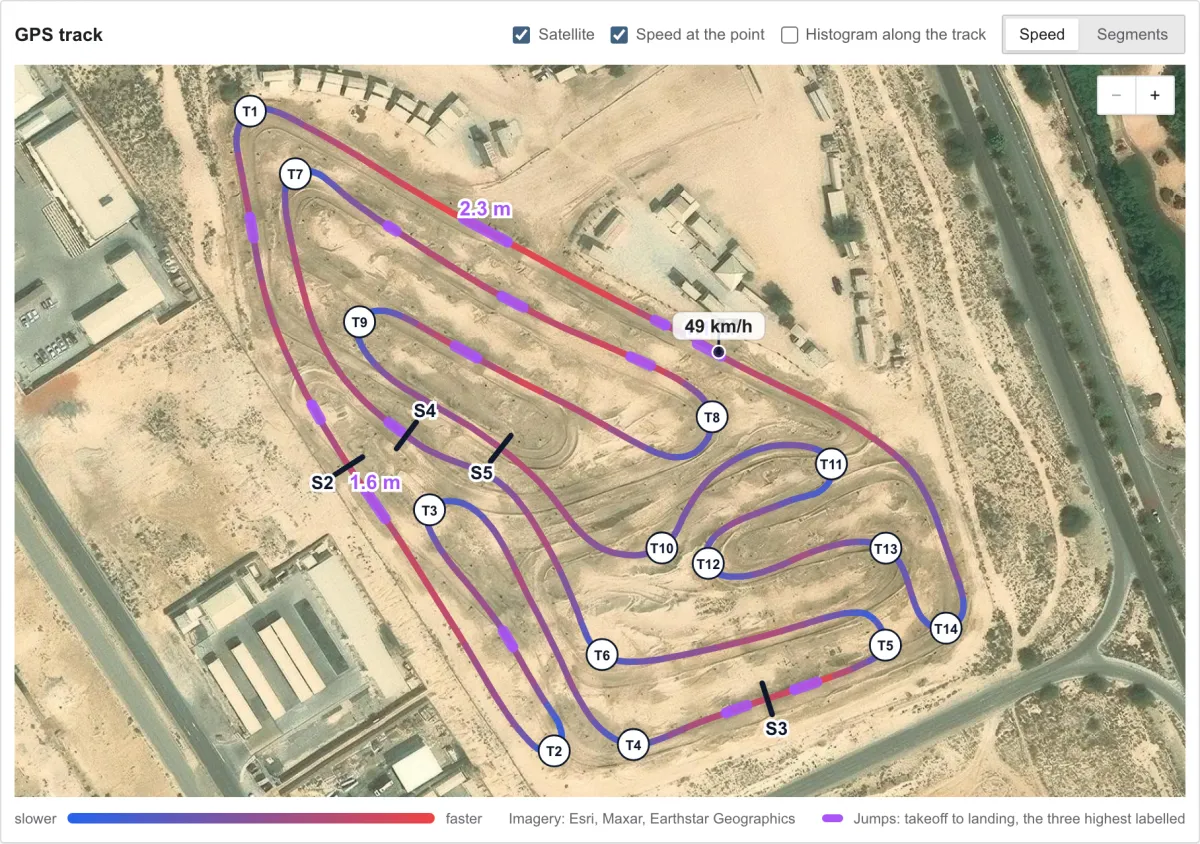
- Each lap over satellite imagery, coloured by speed, with corners and sectors found on their own.
- Lean angle and braking and acceleration along the lap — on the map and on the charts.
- For motocross: the jumps, with take-off, landing, height and airtime.
- Any two laps compared at the same place of the track, even from different days.
- Coaching: time lost in each corner against your best pass, and the likely reason.
Questions
- Does it work with RaceBox Mini S and Micro?
- Yes — what matters is the file. Every RaceBox device exports VBO from the app.
- Can I upload several sessions at once?
- Yes, drop several files together. Each becomes its own session, grouped with the others on the same track.
- The laps in my file look wrong. What can I do?
- Check that the start/finish line was set in the app before riding. Without it the line is found from the track, and you can move the sector lines by hand.
Other apps and loggers
RaceChrono →Files: CSV, VBOThe phone lap timer: export the session as CSV or VBO.AiM (MyChron, Solo, Race Studio) →Files: CSVMyChron, Solo and other AiM loggers through a CSV from Race Studio.MoTeC i2 →Files: LD, CSVThe .ld log straight from the logger, or a CSV from i2.TrackAddict →Files: CSV, GPX, KML, VBORaw or interpolated CSV, or any of its other exports.