

Your line on a satellite map
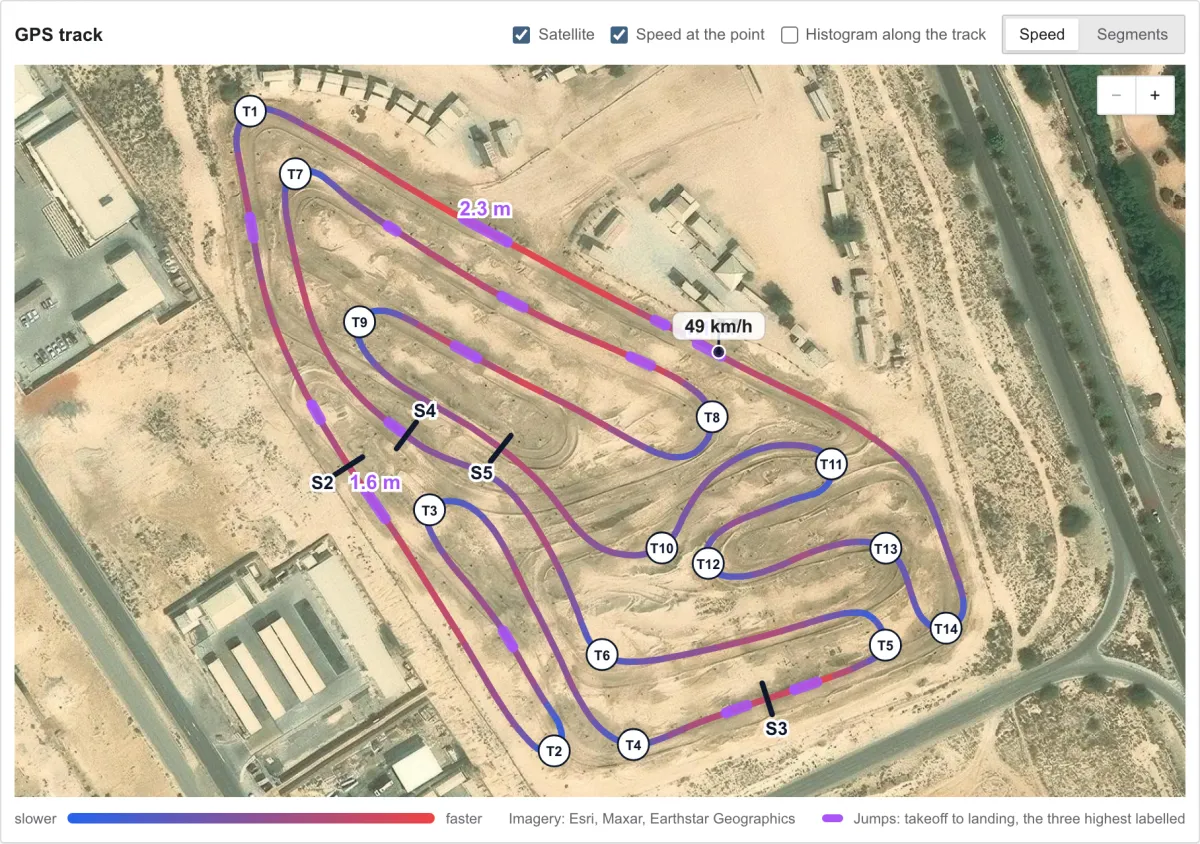
Every lap is drawn where it was ridden, coloured by speed, over satellite imagery of the track.
- Corners are found and numbered on their own, and the lap is split into sectors.
- Bars along the track show speed, braking and acceleration or lean angle place by place.
- Motocross jumps are found too: where you took off and landed, the height and the airtime.
- Press play to watch the lap ridden again, at real speed or faster.
Two laps, place by place
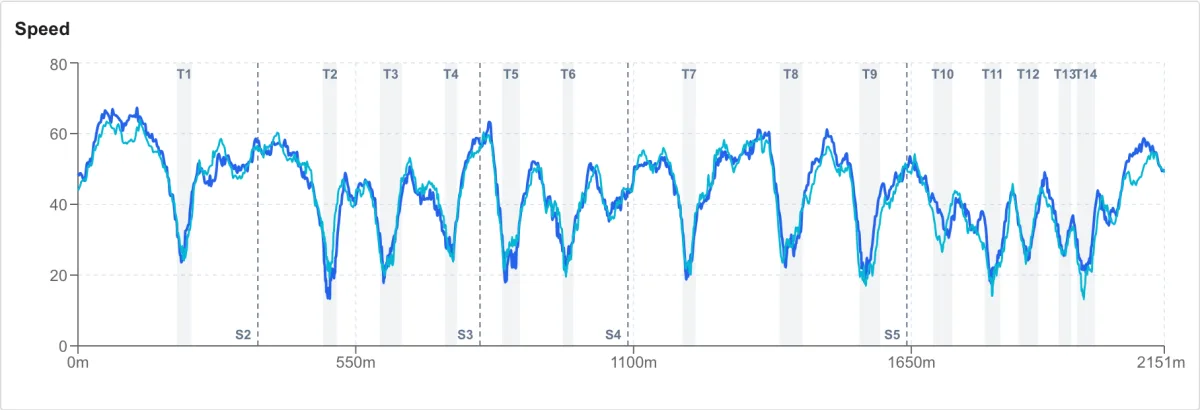
Pick any two laps — from one session or from different days — and lay one over the other.
- Compared at the same place of the track the curves line up even when one lap was ridden faster.
- Or compared at the same moment, to see who was ahead and by how much.
- Time gained and lost along the lap, speed, braking, throttle and brake, steering, lean and altitude.
- Charts run along the distance with every corner and sector marked; zoom with the wheel or a pinch.
Coaching corner by corner
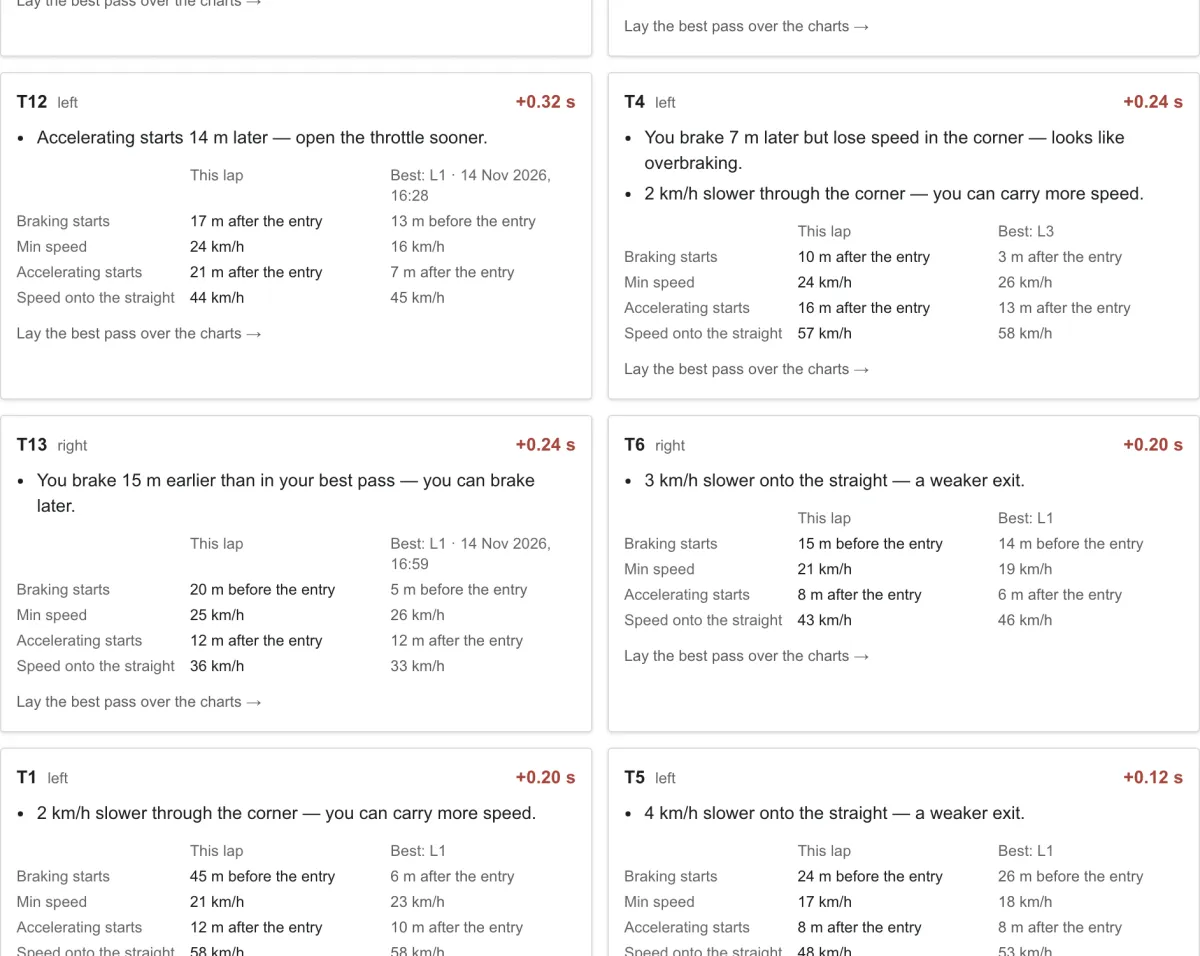
Each corner of a lap is set against your best pass through it, and the difference is put in words.
- Entry, minimum and exit speed, where you braked and where you got back on the throttle.
- How much time the corner cost and why: braking too early, overbraking, a weaker exit or the line.
- Against this session alone or against every session you rode on the track.
Progress across sessions
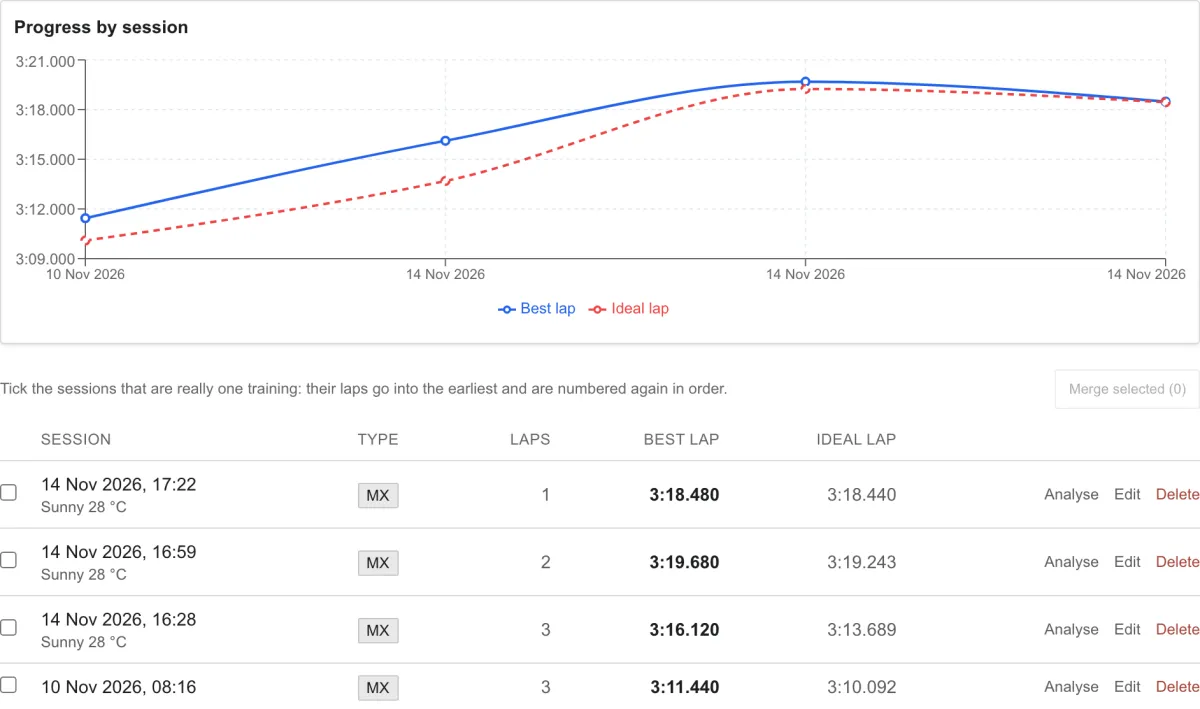
Sessions are grouped by track on their own, so every visit to a track adds to one picture.
- The best and the ideal lap of each session, and how they changed from visit to visit.
- Lap times in the order ridden, with the out lap kept apart from the timed laps.
- The bike or kart, the weather — looked up for you — and your own notes beside each session.
- Sessions that were really one training are merged into one with a click.
How it works
- Export the session from your app or logger — each guide below says where the button is.
- Drop the file on the page. Several files at once are fine. The date, the track and the laps are read from the file itself.
- Open the session: the laps, the map, the comparison and the coaching are ready at once.
Apps and loggers
How to get the file out of each of them, and what we read from it.
RaceBox →Files: VBO, GPX, KMLRaceBox Mini and Micro: the VBO file carries speed, g-forces and lean angle.RaceChrono →Files: CSV, VBOThe phone lap timer: export the session as CSV or VBO.AiM (MyChron, Solo, Race Studio) →Files: CSVMyChron, Solo and other AiM loggers through a CSV from Race Studio.MoTeC i2 →Files: LD, CSVThe .ld log straight from the logger, or a CSV from i2.TrackAddict →Files: CSV, GPX, KML, VBORaw or interpolated CSV, or any of its other exports.
Made for riders and drivers who time their laps
- Motocross and enduro riders with a RaceBox or a phone app on the bike.
- Karting drivers with an AiM MyChron or a GPS lap timer.
- Track days on a motorcycle or in a car, from a phone app to a MoTeC logger.
- Coaches who want to show a rider exactly where the lap was lost.
Your data stays yours
Uploaded sessions are private: only you see them. They are used to draw your own charts and nothing else, and you can delete a session at any time.
Questions
- Do I need an account?
- Yes, so that your sessions are kept for you and seen by nobody else. Signing up takes an email, or a Google or GitHub account.
- Which files can I upload?
- VBO, GPX, KML and CSV files from RaceBox, RaceChrono, TrackAddict and AiM Race Studio, and MoTeC .ld logs. VBO gives the most: speed, g-forces, lean angle and the start/finish line.
- Do I have to set a start/finish line?
- No. A VBO file brings its own line; for other files the line is found from the track you rode, and so are the corners and the sectors. You can still move the sector lines yourself.
- Can I compare laps from different days?
- Yes. Every session on the same track is grouped together, and any lap of any of them can be compared with any other.
- My AiM logger saves .xrk files. Can I upload them?
- Not directly yet. Open the session in Race Studio and export it as CSV — that file uploads as it is.
- What if my file has no GPS?
- The laps and the charts still work, but without positions there is no map and the track cannot be told, so the session is listed on its own.
- How big can a file be?
- Up to 20 MB a file and up to 10 files a day — a full day of riding fits easily.